1. set the promise
Choose the alarm details before bed.
Set the wake time, repeat days, alarm sound, mission, snooze count, sleep reminder, and optional wake-up check in one flow.
One alarm. One mission.
You're up.
Set a mission alarm.
Choose sound and schedule.
Add wake-up check and streak tracking.
1. set the promise
Set the wake time, repeat days, alarm sound, mission, snooze count, sleep reminder, and optional wake-up check in one flow.
2. alarm rings
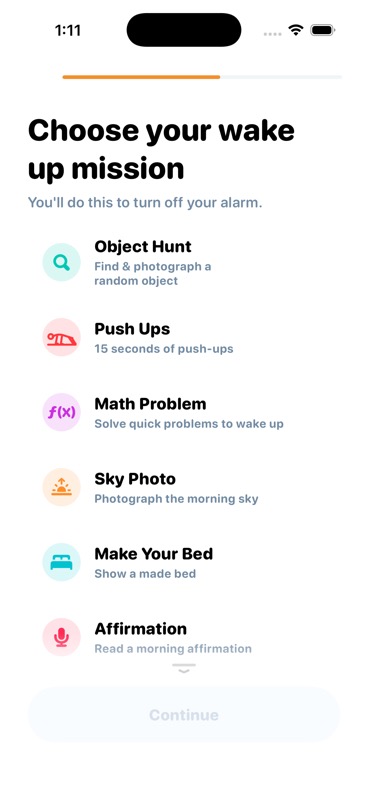
Pick from object photos, push-up camera tracking, math problems, sky photos, making your bed, affirmations, or Bible verses.
3. prove awake
Use wake-up check, limited snoozes, volume guidance, and bedtime reminders to reduce the ways a normal alarm gets ignored.
4. keep the trail
Insights show streaks, badges, average wake time, response time, favorite mission, favorite sound, and wake-time consistency.
MornUp includes seven mission types, from camera verification to speech and math. You can keep one mission simple or stack up to three on a mission alarm.
Find and photograph the requested object before the alarm settles.
Use camera tracking to get moving instead of rolling over.
Solve quick arithmetic offline when you need a mental jolt.
Step toward light and photograph the morning sky.
Show a made bed so the room changes with the alarm.
Speak a short affirmation out loud to start with intent.
Read a short verse aloud for a faith-based wake-up mission.
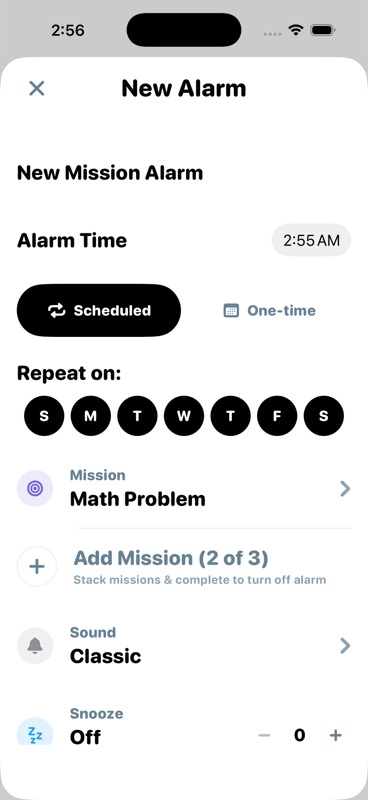
Set repeat days, choose from the sound library, cap snoozes, add a second wake-up check, and use sleep reminders so the morning plan is ready before the alarm rings.
"I stopped bargaining with the alarm. The mission gets me standing before I can talk myself out of the day."
"The streak made mornings feel like a game I wanted to keep winning, not a failure I had to avoid."
"Taking the sky photo sounds tiny, but it gets me near light, air, and a real start."
tomorrow morning is already on the way
MornUp is live on the App Store. Download it now and set up your first mission alarm.